WORKSHOP MANAGEMENT
for 3D printing.
Control brings together filament spools, inventory, models, customers and orders for your 3D printing workshop. Record materials and usage, review estimated costs and margins and update stock from your phone.
Why use Control
Not just a spreadsheet: a management app built for the real work of running a lab, from the workbench to the phone in your pocket.
Optimized for mobile
Built for quick edits from your phone, especially for updating inventory on the fly, without having to sit down at a PC.
Data on every device
Your data is saved in the cloud and loaded when you open Control. You can work from your PC or phone with the same account; if Control is already open on another device, refresh the page to see the latest changes.
Installable anywhere
Installs on any device like an app, no app store needed. No manual updates either: new versions arrive on their own.
Everything in one place
Products, filaments, orders, customers and statistics: no more scattered spreadsheets or a different app for everything.
Update inventory in a couple of taps
From the filament and product lists you can raise or lower stock with a tap, no math involved: Control keeps the count for you.
ControlFilamentsFilaments
12 colors and filaments registered
The same power on the big screen
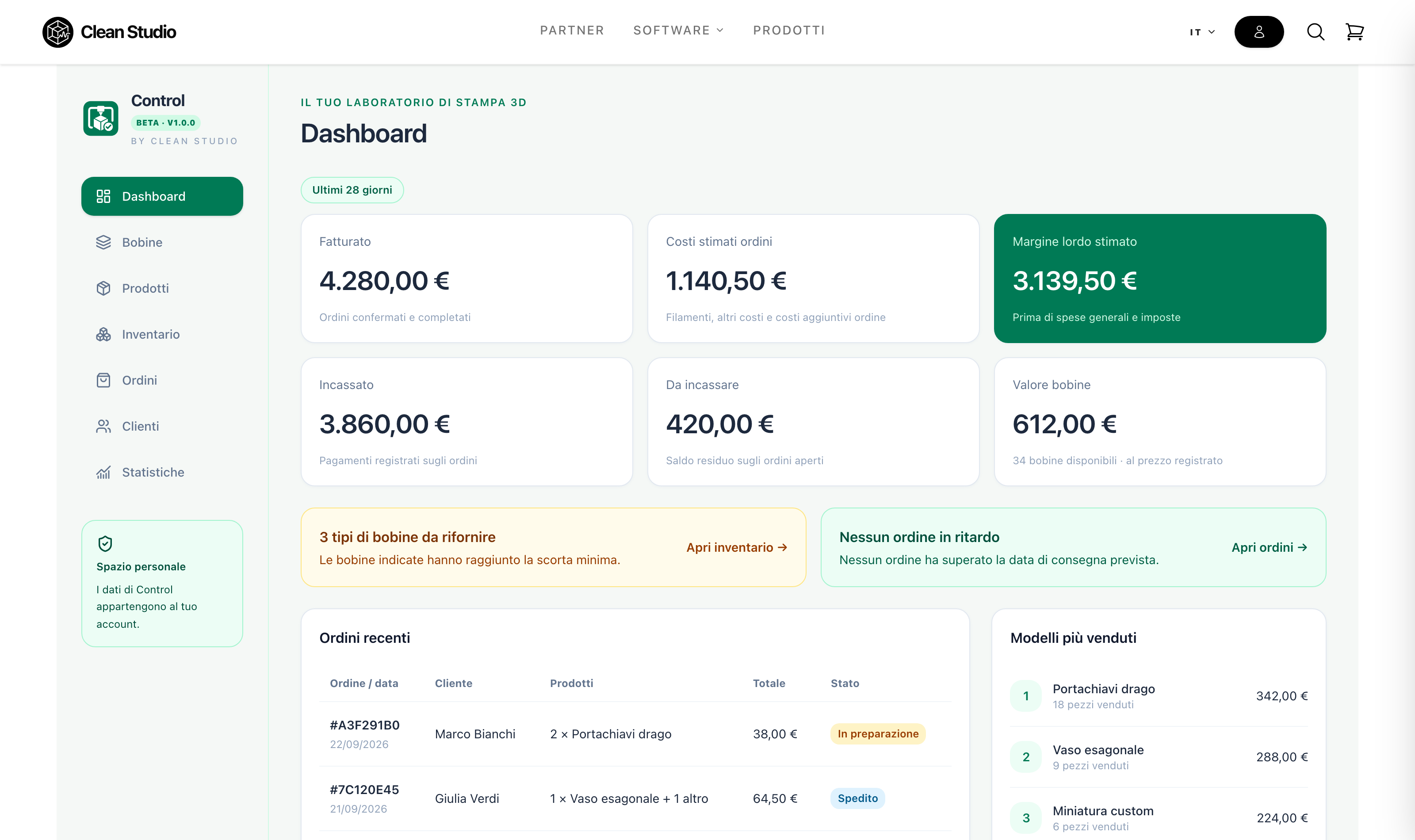
Dashboard, orders, filaments and statistics in a single view, built for people who work at the bench or the desk all day.
Everything you need to run the lab
From the product catalog to your end-of-month statistics, without ever leaving Control.
Products and catalog
- Standard and 3D printed models, with SKU and category
- Filament recipe and estimated cost for every piece
- Height variants, each with its own weight and materials
- Stock you can update with a tap, no math involved
Filaments and inventory
- Filament families by brand, material and average price
- Add several colors from the same family in one go
- "Low stock only" filter to see what needs reordering at a glance
- Full history of stock in, out and adjustments
Orders
- Multiple lines per order, with products and variants
- Status and priority calculated automatically from the due date
- Shipping with courier and tracking, or in-store pickup
- Extra costs automatically subtracted from net revenue
- Payments, refunds and partial returns, with stock restored on its own
- CSV export and a printable PDF order sheet
Customers
- Contact details with email and phone
- Up to 10 delivery addresses per customer
- Full order history for every customer
Statistics and dashboard
- Revenue, costs and margin over any period you choose
- Best-selling products
- Collected balance and what's still outstanding
- Automatic alerts for low stock and overdue orders
Notifications and security
- Alerts for filaments to reorder and overdue orders, visible right on the tabs
- Every account only ever sees its own data, fully secured
- Interface available in Italian, English, French, German and Spanish
How it works
Set up
Add your products, filaments and first customers: it only takes a few minutes to get started.
Work
Log orders as they come in and update stock with a tap, even from your phone.
Check in
Look at statistics, low stock and overdue orders whenever you want, from any device.
Practical guide
How to organise filament spools and 3D printing orders
Control connects your model catalogue with material inventory and workshop orders.
Record materials and models
Add spool families, prices and stock levels. For each product, define its filament recipe and any variants with their own weights and materials.
Organise customers and orders
Add products to orders and record customers, deadlines, payments and deliveries. Update stock while working, including from your phone.
Review costs and restocking
Check estimated costs, margins, best-selling products and low-stock alerts. Use movement history to review consumption and adjustments.
Estimates depend on the prices and recipes you enter. Data is saved in the cloud: if Control is already open on another device, reload the page to see the latest updates.
Ready to get organized?
Control is included in the Partner Plus and Pro plans. Activate your subscription and start keeping products, orders and stock under control.
Become a Partner